KYA: Delegated Authority — Trust Must Narrow at Every Handoff
When authority moves from a human to an agent, sub-agent, and tool, each handoff must narrow — never expand — what may be done.
Lab 002 explores what happens when authority moves from a human to an agent,
sub-agent, and tool. Select a scenario to see how delegation, profiling,
posture, limits, revocation, and fallback influence the decision.
Educational simulation with fictional principals, agents, delegations, and posture evidence. No real accounts, credentials, or transactions. Execution is never performed.
Authority narrows from the Human Principal to the Portfolio Agent, Research Agent,
and requested tool. The Trust Gateway evaluates identity, delegation, profile,
posture, limits, and context before returning a decision.
Animated GIF not installed yet — showing the local end-to-end workflow diagram. See docs/ASSETS.md.
How to use this Lab
Choose a scenario that matches the boundary you want to explore.
Evaluate the request and watch identity, delegation, profile, and posture.
Follow the decision and fallback — nothing is executed.
Suggested demo order: Valid narrow delegation → Human confirmation required →
Stale posture evidence → Execution not delegated → Parent revoked.
Authority must narrow
Each handoff may only keep a subset of what the parent already holds.
Human Principal
Research, propose, approve
Limit 20,000
Redelegation yes
Depth 2
→
Portfolio Agent
Research, propose
Limit 15,000
Redelegation yes
Depth 1
→
Research Agent
Research only
Limit 5,000
Redelegation no
Depth 0
→
Requested Tool
May act only within effective authority
Scenario presets
Each preset is a complete fictional evaluation. No transaction is executed.
Valid and recoverable
Delegation failures
Lifecycle failures
Profile and posture failures
Evaluation input summary
Readable fictional inputs for the selected scenario.
Requested capability
—
Requested resource
—
Fictional amount
—
Request time
—
Agent classification
—
Profile confidence
—
Posture status
—
Parent delegation status
—
View fictional request JSON
Select a scenario.
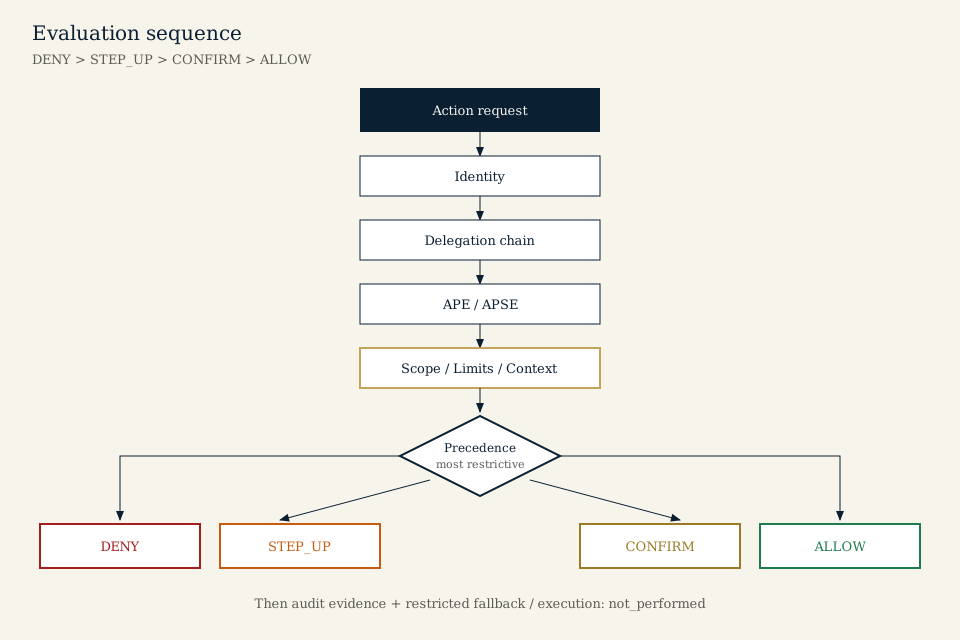
Ordered policy evaluation
Identity, delegation, APE profile, and APSE posture are checked in order.
DENY outranks STEP_UP, CONFIRM, and ALLOW. Execution stays separate.
This diagram teaches the evaluation order. The interactive stepper below shows
the same stages for the selected scenario.
Evaluation journey
1
Identity
Waiting
Select a scenario and evaluate.
2
Delegation
Waiting
Parent-child authority is checked next.
3
APE Profile
Waiting
Profiling informs trust; it never grants authority.
4
APSE Posture
Waiting
Posture may restrict existing authority only.
5
Policy Decision
Waiting
DENY outranks STEP_UP, CONFIRM, and ALLOW.
Good identity, profile, or posture cannot create missing authority.
Decision result
Choose a scenario, then evaluate. The service returns a decision only — it does not execute any tool action.
Safe fallback
The original decision remains unchanged. Fallback does not execute the protected action.
New evaluation required.
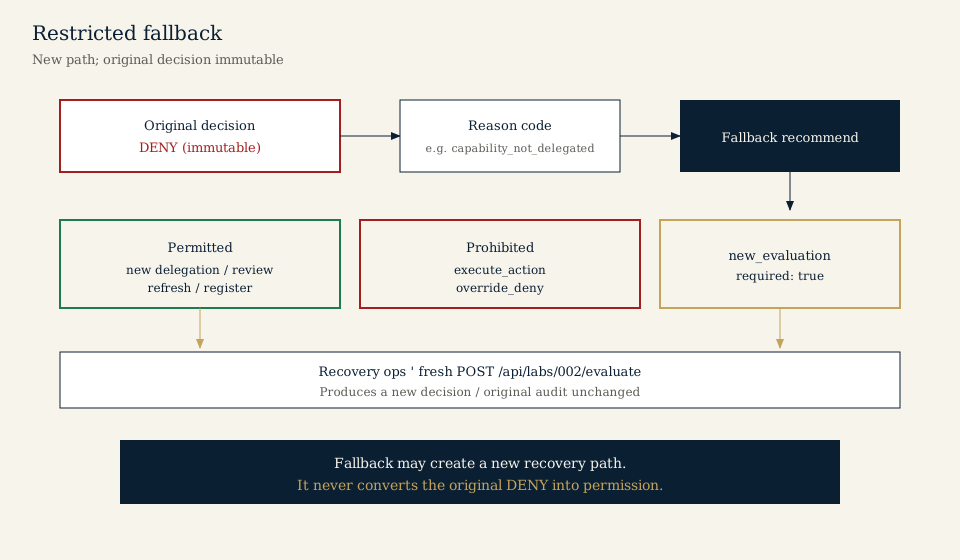
Restricted fallback
After DENY or a recoverable challenge, fallback may prepare a recovery path.
It does not execute the protected action and does not change the original decision.
Fallback never overrides DENY. It only opens a path to a new, separately evaluated request.
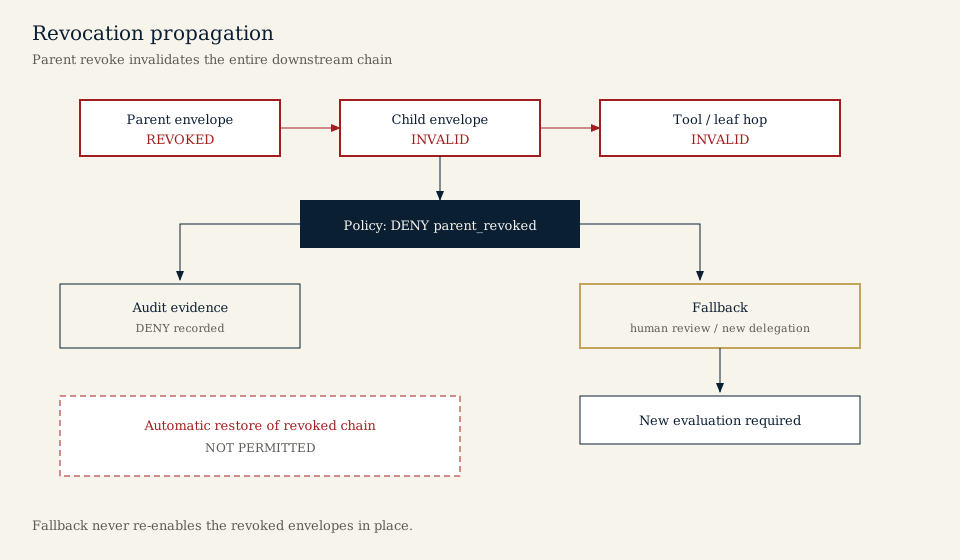
Revocation propagates downstream
When a parent delegation is revoked or expires, every child handoff collapses.
Confirmation cannot repair a hard lifecycle failure.
Try the Parent revoked or Parent expired presets to see this lifecycle rule in the decision panel.
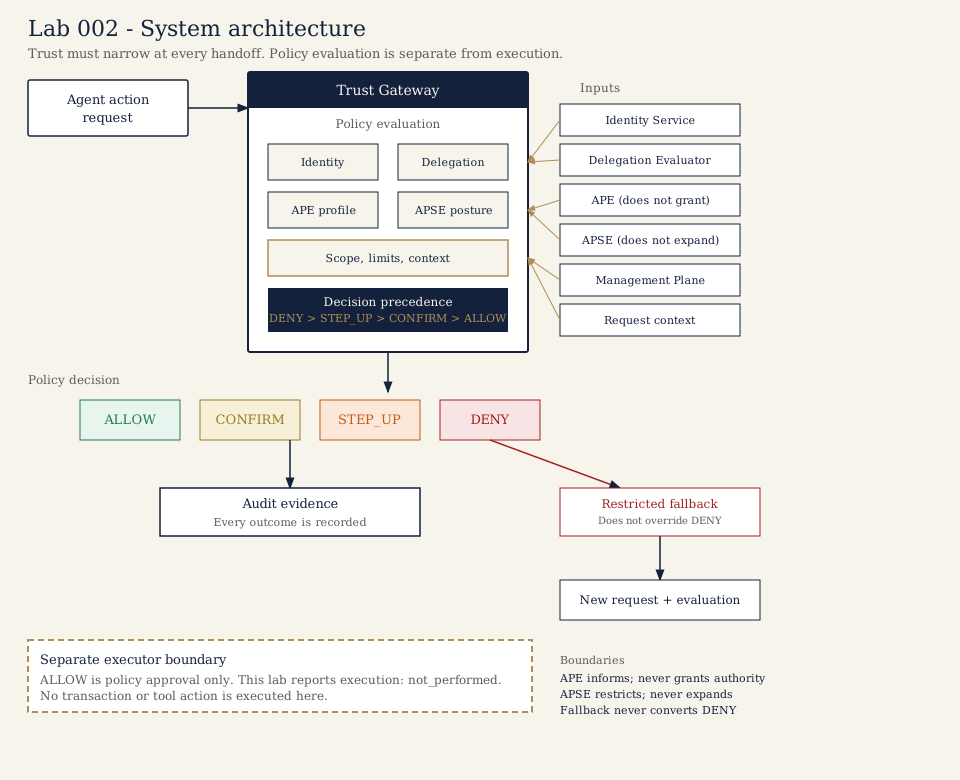
System architecture
Inside the Trust Gateway: identity, delegation, APE profile, APSE posture,
management plane, and request context feed a policy decision. APE informs but
does not grant authority. APSE restricts but does not expand it. Evaluation
stays separate from execution.
Internal Trust Gateway architecture. Fallback never overrides DENY.
Every result produces audit evidence.
Every evaluation reports execution: not_performed. ALLOW is
short-lived and bound to the evaluated request.